As I have taken a break from Facebook it’s important to up my game on Twitter. One thing I wanna do there is to engage my blog readers and other friends who are there to make them aware of my presence. Blogging and Tweeting seem to be good friends so I want to take advantage of that. Sometimes you need more than 140 characters to share whats on your mind. Granted the stream on Twitter is different from Facebook in that you see more users at one time on Facebook so you have to stand out among the crowd. So far though I haven’t seen as much inbound interaction on Twitter as of yet. You are welcome to follow me there as well as my other social outlets.
BTW my Facebook break is going well. Haven’t missed it much.
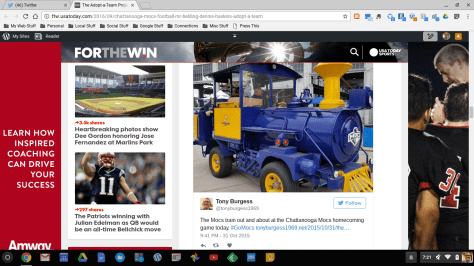
This is a screenshot of a USA Today sports blog featuring one of my tweets! A sportswriter is adopting a college football team and he chose the University of Tennessee at Chattanooga. UTC is my hometown team. In doing research for his series he found this tweet I did and he embedded it into his article. So thousands of readers are looking at this and I couldn’t be more excited! This is way cool!
Twitter has the feature of letting tweets be embedded in blogs and other sites. I am using this option to help curate things I am interested in. To see the embedded tweets in my blog you need to see the blog itself and not through the WordPress Reader because it doesn’t display the way it should.
Embedding tweets is a great way to bring new content and link people to stories on the web you want to share. To find out more on how to do this visit https://support.twitter.com/articles/20169559 where they have complete instructions. Now in WordPress you will need to use the HTML not the Visual editor to do this.




 The Tony Burgess Blog